Compress a PDF to 100 KB, 200 KB or any size on your Android phone
An application form wants a PDF under 200 KB; your scan is 6 MB. PdfShrink makes it fit: pick the limit, and the app keeps as much quality as still fits under it. It works offline, adds no watermark, and your original file is never changed.

Free on Google Play for Android 7.0 or newer. The app shows ads; a one-time purchase removes them. No subscription.
What you get
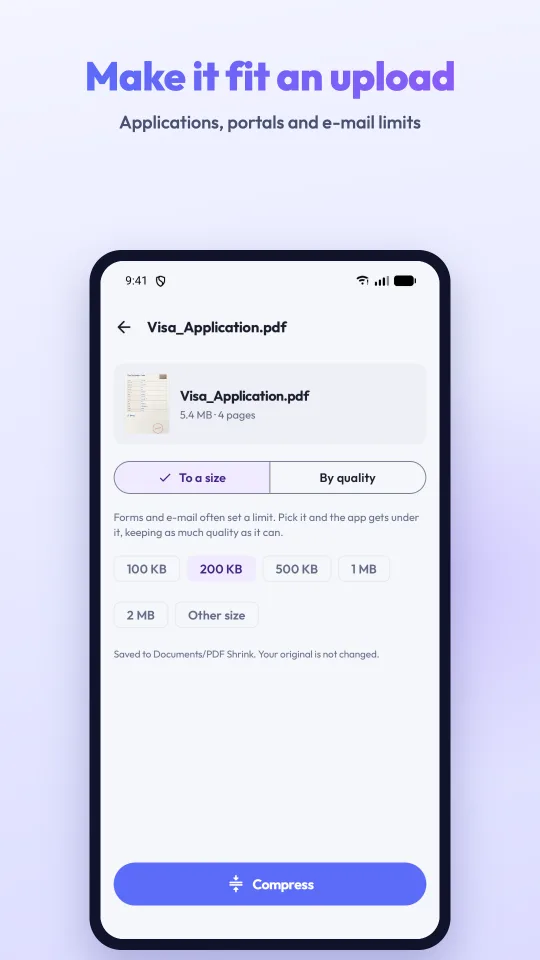
- Pick the exact limit100 KB, 200 KB, 500 KB, 1 MB, 2 MB, or type your own, such as 300 KB.
- Most quality that still fitsThe app tries the lightest setting first and only goes as far as the limit needs.
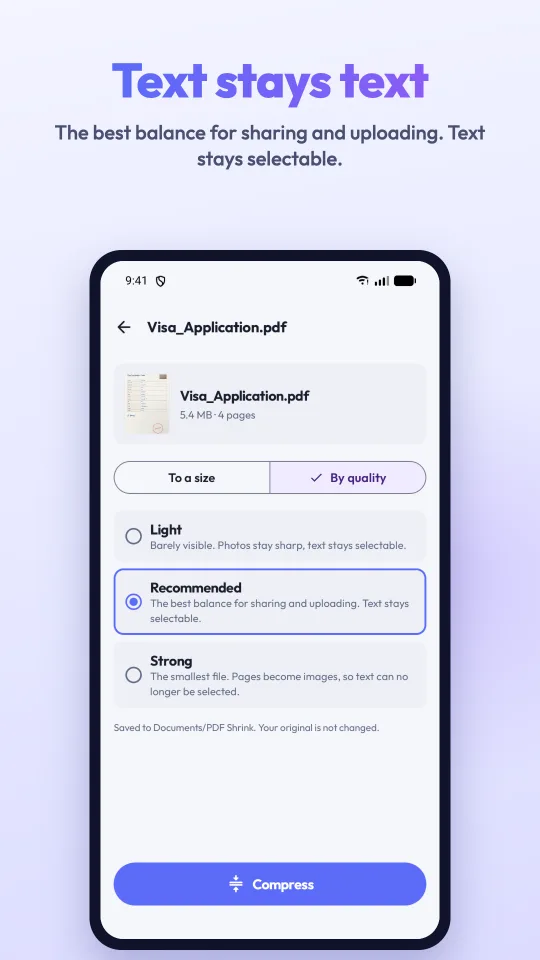
- Or choose a quality levelLight and Recommended shrink the pictures and keep the text selectable; Strong gives the smallest file.
- Text stays textLight and Recommended leave text, links and vectors alone. Only Strong turns pages into images, and it says so first.
- Your original stays untouchedThe smaller copy is a new PDF in Documents/PDF Shrink.
- No watermark, no accountNothing is stamped on your pages. No sign-up: open the app and use it.
- Works offlineDocuments are compressed on the phone and never uploaded.
- Share straight awaySend the result to e-mail, WhatsApp or a browser upload from the Done screen.
How to reduce a PDF to 200 KB (or any size) on Android
- Open PdfShrink and tap Compress a PDF, then pick your file. You can also share a PDF to the app from your file manager or WhatsApp.
- Keep To a size selected and tap the limit the form states: 100 KB, 200 KB, 500 KB, 1 MB or 2 MB. For another number tap Other size and type it, for example 300 KB or 1.5 MB.
- Tap Compress. The app tries the lightest setting first and stops at the first one that fits.
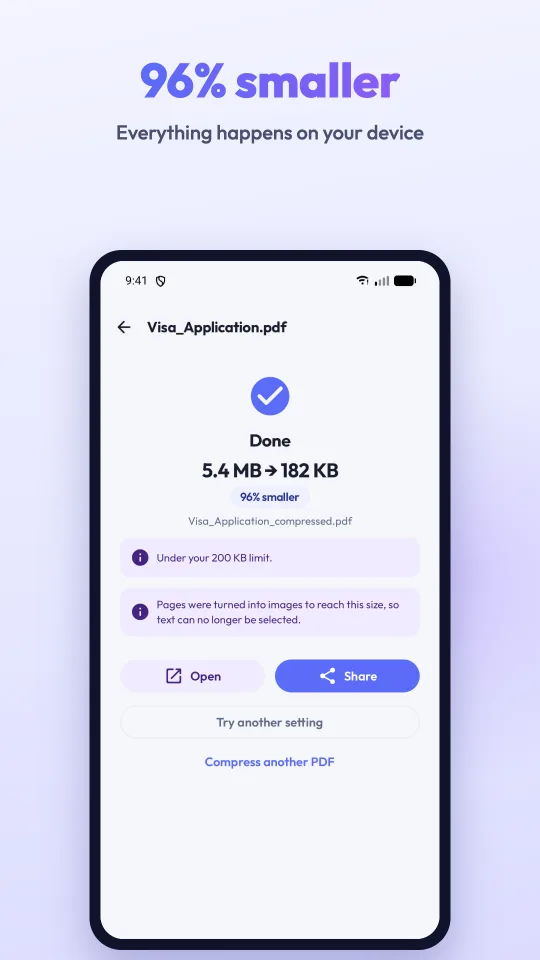
- On the result you see the old and new size and whether it is under your limit. Tap Share to send it or Open to check it.
Questions people ask
How do I reduce a PDF to 200 KB on Android?
Open the PDF in PdfShrink, keep "To a size", tap 200 KB and tap Compress. The app picks the lightest setting that brings the file under 200 KB and tells you the result, for example "5.4 MB → 182 KB, under your 200 KB limit".
Can it compress a PDF to 100 KB or even 50 KB?
Yes. Tap 100 KB, or tap Other size and type a number from 20 KB up. Scans and photo PDFs reach small limits easily; a very long document may not fit under a tiny limit, and then the app says so and gives you the smallest file it can make.
Will the text stay sharp and selectable?
With Light and Recommended, yes: only the pictures inside the PDF are re-encoded, and text, links and vector drawings are left alone. The Strong level and very small size limits turn pages into images, which can no longer be selected; the app tells you when that happened.
Why did my PDF hardly get smaller?
A PDF that is mostly text is usually already small, because text takes very little space. PdfShrink will not make it worse to save a few bytes: it says the file is already compact. Choose Strong or a size limit if you need it smaller anyway.
Is my original PDF changed? Where is the smaller file?
Your original is never modified. The compressed copy is a new PDF named like "document_compressed.pdf" in Documents/PDF Shrink, an ordinary folder any file manager can open.
Does it add a watermark? Is it free?
No watermark is ever added. The app is free and shows ads: a banner and a short ad after a finished job, announced first. One purchase removes all ads; there is no subscription.
Does it work offline? Are my files uploaded?
Compression happens entirely on your phone and needs no internet. Files are never uploaded, and there is no account. The connection is used only for ads, the remove-ads purchase, and anonymous usage statistics and crash reports.
Can it compress a password-protected PDF?
Not yet: Android cannot open a password-protected PDF without the password, and the app has no place to enter one. Remove the password first, then compress.
Which phones and languages?
Android 7.0 or newer. The app is in 30 languages, including English, Türkçe, Español, Português, العربية, हिन्दी, فارسی and Bahasa Indonesia, and follows your phone's language. There is no iPhone version.
PdfShrink